Your first studio partner.
Euterpe is built for people who have musical ideas but haven't figured out how to make them real yet. No jargon, no assumed knowledge — just clear, step-by-step guidance that grows with you.
AI-powered production features
Creative-first AI tools that provide intelligent assistance for all skill levels with smart automation and expert guidance.
A guide that explains everything
Every suggestion comes with a plain-language explanation of why it works. You're not just getting help — you're learning the craft in the context of your own music.
- →Answers your questions in plain language
- →Explains mixing and sound design concepts as you go
- →Helps you make decisions without second-guessing yourself
- →Builds your skills session by session
Handles the tech so you stay creative
When you hit a technical wall — wrong settings, confusing menus, something that just won't work — Euterpe can step in and fix it while explaining what happened.
- →Launch and control your DAW
- →Use voice commands or chat
- →Run repeatable processes
- →Safe, permissioned actions
Tells you what your mix needs
In plain terms, not technical readouts. Euterpe listens to your track and tells you what's off and what to try — like a knowledgeable friend sitting next to you.
- →"Your low end is muddy — try this"
- →Flags problems before you think something is done
- →Explains the issue and the fix together
- →No reading graphs required
You learn as you go
Most tutorials teach theory. Euterpe teaches you inside your actual project — explaining every decision in real time so the skills stick, not just the result.
- →Explains why, not just what to do
- →Tracks what you've learned over time
- →Adapts to your skill level automatically
- →No courses, no homework — just making music
Inside Euterpe Studio
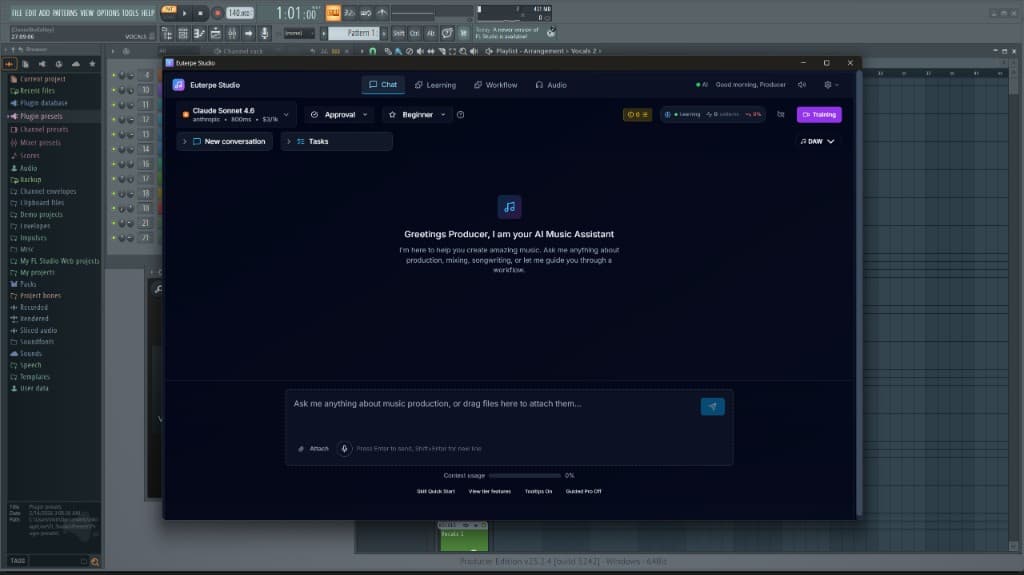
Five panels in the app, one quiet muse. Click through chat, learning, workflow, projects, and audio views.
Supported plugins
Now shipping with full Serum 2 integration.
Serum 2
Xfer Records · Wavetable synthesizerSerum 2 is the industry-standard wavetable synth. Euterpe drives every part of it for you — describe a sound and hear it without ever touching the patch browser.
Describe the sound you want in plain English and Euterpe builds a brand-new Serum 2 preset from scratch.
Adds Serum 2 to any track from your DAW's plugin browser — no manual drag-and-drop required.
Loads patches and switches between presets mid-session, matched to the sound you described.
Tweaks macros, filter, FX, and wavetable parameters to dial in the timbre you want.
Writes MIDI patterns directly into Serum 2 channels — leads, basses, plucks, pads.
Have a plugin you'd like Euterpe to support next? Let us know.
Minimum system requirements
What your machine needs to run Euterpe Studio smoothly.
Minimum requirements
Minimum requirements
Enhance your production workflow
Release your music
From finished track to Spotify, Apple Music, and 450+ services without leaving Euterpe.
Real distribution, no Euterpe take-rate
- Delivery to Spotify, Apple Music, Amazon Music, YouTube Music, Tidal, Deezer, TikTok, SoundCloud, and 440+ more
- Euterpe takes no cut of your streaming revenue and charges no per-release fees on our side
- Euterpe integrates with Too Lost — an independent music distribution service used by 250k+ artists and a preferred distributor for most platforms
- One-click publish from any finished project — Euterpe drives Too Lost's API so you stay in your workflow
Four steps, browser-based
- Finish your track in your DAW — Euterpe helps with the production
- Hit "Distribute" from the project — the wizard opens in your browser
- Drop your master + cover art, fill in title + genre + release date, submit
- Track per-DSP delivery status as your release lands on each service
Bring your aggregator account
- Sign up with our integrated distribution aggregator directly — separate service, separate pricing
- Connect via OAuth from your Euterpe account settings on the Basic plan or above
- Euterpe charges no extra fee for using the integration and takes no share of your streaming revenue
- Royalties flow directly to the payout method you configure in your aggregator account — Euterpe never touches the money
Ready to finish your first track?
Euterpe is designed for producers who are just starting their journey. Sign up and start producing today.